반응형
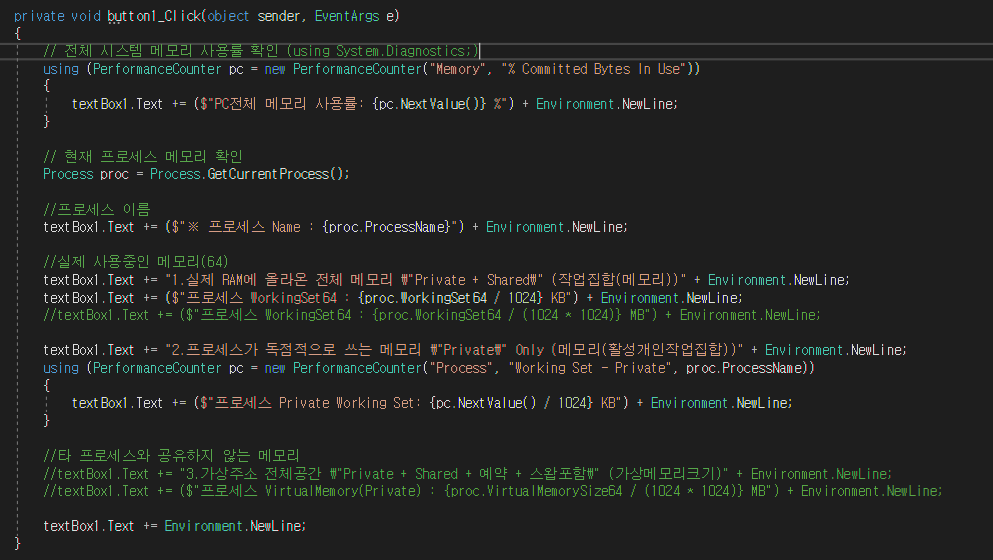
C#에서 현재 프로세스에서 사용중인 메모리와 가용율 등을 확인하기 위함 샘플
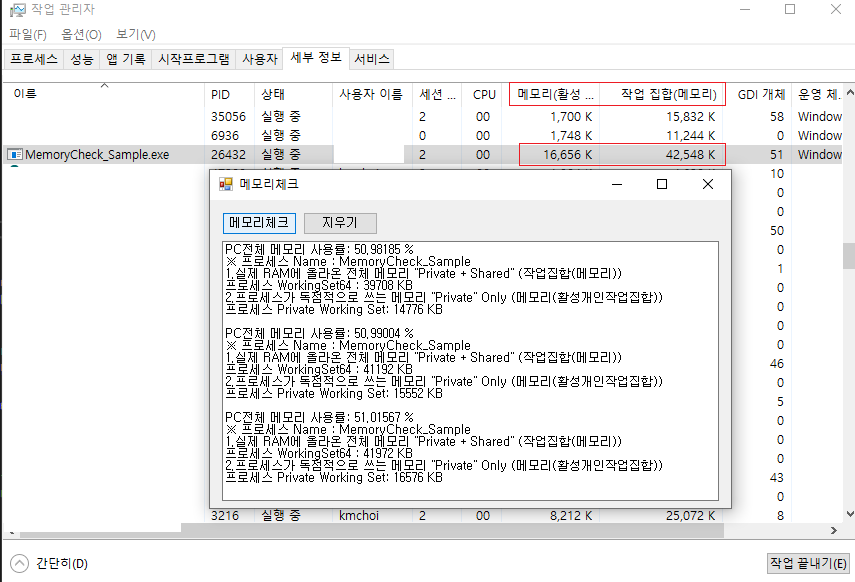
윈도우10이후부터는 메모리표시가 메모리(활성개인작업집합) 이란 항목으로 표시됨
// 전체 시스템 메모리 사용률 확인 (using System.Diagnostics;)
using (PerformanceCounter pc = new PerformanceCounter("Memory", "% Committed Bytes In Use"))
{
    textBox1.Text += ($"PC전체 메모리 사용률: {pc.NextValue()} %") + Environment.NewLine;
}

// 현재 프로세스 메모리 확인
Process proc = Process.GetCurrentProcess();

//프로세스 이름
textBox1.Text += ($"※ 프로세스 Name : {proc.ProcessName}") + Environment.NewLine;

//실제 사용중인 메모리(64)
textBox1.Text += "1.실제 RAM에 올라온 전체 메모리 \"Private + Shared\" (작업집합(메모리))" + Environment.NewLine;
textBox1.Text += ($"프로세스 WorkingSet64 : {proc.WorkingSet64 / 1024} KB") + Environment.NewLine;
//textBox1.Text += ($"프로세스 WorkingSet64 : {proc.WorkingSet64 / (1024 * 1024)} MB") + Environment.NewLine;

textBox1.Text += "2.프로세스가 독점적으로 쓰는 메모리 \"Private\" Only (메모리(활성개인작업집합))" + Environment.NewLine;
using (PerformanceCounter pc = new PerformanceCounter("Process", "Working Set - Private", proc.ProcessName))
{
    textBox1.Text += ($"프로세스 Private Working Set: {pc.NextValue() / 1024} KB") + Environment.NewLine;
}

//타 프로세스와 공유하지 않는 메모리
//textBox1.Text += "3.가상주소 전체공간 \"Private + Shared + 예약 + 스왑포함\" (가상메모리크기)" + Environment.NewLine;
//textBox1.Text += ($"프로세스 VirtualMemory(Private) : {proc.VirtualMemorySize64 / (1024 * 1024)} MB") + Environment.NewLine;

textBox1.Text += Environment.NewLine;
반응형
'I.T > Programming' 카테고리의 다른 글
| [C#] 특정 파일 버전 비교하기 샘플 (File Version Compare) (1) | 2025.02.07 |
|---|---|
| [C#] RGB Color to Int, 칼라 변환 (0) | 2024.11.13 |
| [C#] Intptr to String, PtrToString, 마샬링 Use C++ parameter in C# (0) | 2023.07.17 |
| [C#] Image RawData 가져오기, C++ ↔ C#, Parameter Marshal(마샬링) (0) | 2023.07.17 |
| [C#] 클래스가 등록되지 않았습니다. HRESULT 0x80040154 (REGDB_E_CLASSNOTREG) exe 실행 안됨 (0) | 2022.08.25 |